

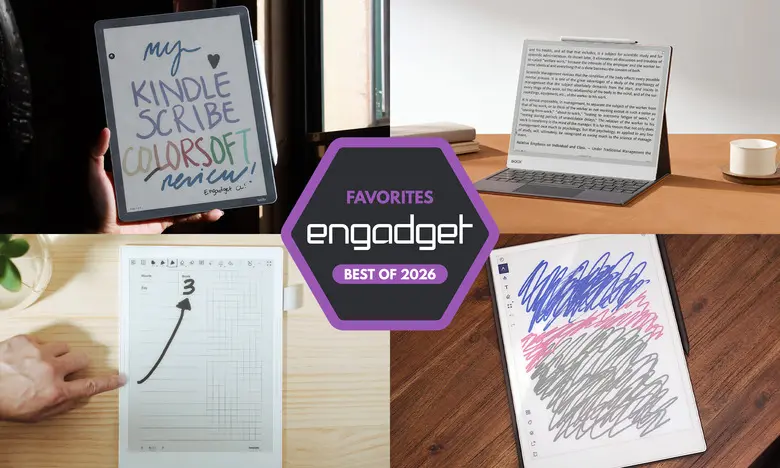
The Best E Ink Tablets for 2026
E Ink tablets have come a long way from being niche digital notebooks to becoming versatile tools for reading, writing, and organizing your thoughts. These devices offer a paper-like experience that is gentle on the eyes, and with increasingly better stylus support, they have become a genuine alternative to conventional tablets for many people. Whether you are a student who wants to neatly save lecture notes, a professional marking up PDFs, or someone who simply loves the feel of a paper notebook but wants the convenience of digital storage, there is an E Ink tablet for you.
Best E Ink Tablet for Most People: reMarkable 2
The reMarkable 2 remains the best E Ink tablet for most users because it blends excellent hardware with a refined, hassle-free software experience. Its 10.3-inch monochrome display is sharp and crisp, and the slim design weighs less than a pound, making it easy to carry around. Writing on the reMarkable 2 is a joy: there is almost no lag between the pen and the screen, and the textured surface gives you a satisfying tactile feel. The tablet supports PDF and EPUB files, and you can easily transfer documents through the companion mobile app, a desktop client, or by syncing your Google Drive, Microsoft OneDrive, or Dropbox account.
The device includes a set of useful organization tools, such as the ability to create multiple notebooks, folders, and \"quick sheets\" for jotting down ideas. You can also convert handwritten notes into typed text with surprising accuracy. The on-device experience is distraction-free, which is exactly what many people are looking for in such a device. However, the stylus is sold separately, and advanced cloud sync features require a subscription after the initial one-year trial.
Pros
- Excellent reading and writing experience
- Works with Google Drive, OneDrive, and Dropbox
- Simple and intuitive software
Cons
- Marker costs extra
- Expensive given what it does
- Unlimited cloud storage requires a subscription
Best Premium E Ink Tablet: reMarkable Paper Pro
ReMarkable's Paper Pro is the premium choice for those who want a bigger, faster, and more colorful E Ink tablet. It features an 11.8-inch display that uses reMarkable's Canvas Color technology, which can produce far more colors than previous color E Ink screens. The larger screen makes it feel more like writing on a legal pad, and the 5.1mm thick body is surprisingly portable. Performance is greatly improved over the reMarkable 2, with faster page refreshes and a stylus latency of just 12 milliseconds.
The color display is the defining feature. You can highlight text in different hues, layer colors, and even draw in shades of gray or full color. The software remains just as streamlined as on the reMarkable 2, keeping the environment focused and uncluttered. Storage is ample at 64GB, but you still need to pay extra for the stylus, and reMarkable's Connect subscription is the only way to get unlimited cloud storage and full note editing on mobile apps. Nevertheless, the Paper Pro feels like a luxury E Ink tablet and is worth the high price for those who want the best.
Pros
- Color adds a new dimension to note-taking
- Front light allows use in dark environments
- Noticeably faster performance
Cons
- Very expensive
- Stylus not included in the base price
Best E-Reader E Ink Tablet: Amazon Kindle Scribe
The Amazon Kindle Scribe is the best choice for people who want an E Ink tablet that is also a full-fledged e-reader. The current model features an 11-inch display with uniform bezels and an improved front light system. It is faster than previous Scribes, making navigation and writing feel incredibly smooth. The included premium pen is comfortable to hold and attaches magnetically to the side of the device for secure storage.
One of the strongest reasons to pick the Scribe is its seamless integration with the Kindle ecosystem. If you own many Kindle books or subscribe to Kindle Unlimited, you can access your entire library and mark up documents with ease. You can take notes in sticky notes or separate notebooks, and the new AI Search feature can help you find and synthesize content from your handwritten notes, though it is not always reliable. The Scribe's home screen provides quick access to recent books, notebooks, and other features. There are a few different Scribe models available, with the $500 model offering the improved front light system and a $630 Colorsoft version featuring a color display.
Pros
- Fast, smooth performance
- Low-latency writing experience
- Excellent Kindle library integration
- Premium pen included
Cons
- AI Search can be hit-or-miss
- Marking up Kindle books is inconsistent
Best E Ink Tablet for Writing and Note-Taking: Supernote A6 X2
Supernote has gained a loyal following among note-taking enthusiasts, and the A6 X2 (also called the Nomad) is proof of that. With a 7.8-inch display, it is smaller and more portable than many rivals, making it feel like a digital notebook that you can take anywhere. The device is user-repairable, featuring a replaceable battery and a microSD card slot, which is rare in this category. Its FeelWrite 2 screen protector provides a smooth, paper-like writing surface that many find excellent.
The software is packed with options for customization. You can choose from a range of built-in templates or import your own, and the tablet supports many file formats, including PDF, EPUB, and Word. Handwriting recognition is particularly good: you can lasso handwritten text, convert it to typed text, and even add keywords to make it searchable. There is also an Atelier painting app for more creative users. The device lacks a front light, so you will need external lighting in dark settings. The stylus is not included, which is a drawback. Still, for pure note-taking, the Supernote A6 X2 is one of the most enjoyable and customizable devices available.
Pros
- Excellent writing experience
- Highly customizable note templates
- Good handwriting recognition
- Replaceable battery and microSD slot
Cons
- Pen sold separately
- No backlight
Another Color-Display Option: Onyx Boox Note Air4 C
If you want a color E Ink tablet that also runs Android apps, the Onyx Boox Note Air4 C is a compelling choice. This 10.3-inch tablet has a color E Ink screen and runs Android 13, giving you access to the Google Play Store. That means you can install apps like Kindle, Kobo, and even some web browsers. Its writing experience is solid, with low latency and several brush options in the native notebook app. You can even add color to your notes and create different shapes.
The tablet is also quite versatile when it comes to file management. You can transfer documents from a computer, sync with cloud services, or download files directly using the browser. A stylus is included in the box, which is a welcome bonus. The device is heavier and more expensive than some rivals, and the E Ink screen is not ideal for watching videos, but for reading and writing it is very capable. If you want the flexibility of a full Android tablet without an LCD screen, the Boox Note Air4 C is worth considering.
Pros
- Color E Ink display
- Android 13 with Google Play access
- Supports many file formats
- Stylus included
Cons
- Not the most user-friendly interface
- Expensive
- E Ink is not great for video
A Big-Screen Option: Onyx Boox Note Max
Most E Ink tablets top out at 10 or 11 inches, but the Onyx Boox Note Max offers a huge 13.3-inch display with a sharp 300 DPI resolution. This makes it ideal for reading large PDFs, sheet music, or for those who simply prefer writing on a big canvas. Like its smaller sibling, the Note Max runs Android 13 and has access to the Google Play Store. The large screen makes the Calendar Memo app particularly useful, as you can see whole months and tap into individual days to add notes.
The writing experience on this large display is remarkably smooth, and the included stylus works well. There is no front light, so it is not ideal for reading in low-light conditions, and the price of $689 puts it in the premium category. For people who need the largest possible e-paper workspace, the Note Max is an excellent, albeit expensive, choice.
Pros
- Sharp 13.3-inch display
- Great for large-format PDFs and notes
- Android 13 with Google Play
- Stylus and cover included
Cons
- No front light
- Expensive
- Steep learning curve
Honorable Mention: reMarkable Paper Pro Move
reMarkable also offers a smaller version of its Paper Pro called the Paper Pro Move. This 7.3-inch tablet resembles a steno pad and is far more portable, making it a great option for people who are always on the go. It has the same Canvas Color screen technology and the same excellent writing feel as the larger Paper Pro. The device runs the same software as its bigger sibling, so you get access to all of the note-taking tools and cloud features. Since it is designed for portability, there is no keyboard folio option, but the on-screen keyboard is sufficient for occasional typing. At $449 for a bundle with the standard marker, it is more affordable than the full-size Paper Pro, though still pricey for its size.
Pros
- Compact and portable
- Excellent build quality
- Good battery life
Cons
- Expensive for a small tablet
- No keyboard folio
Honorable Mention: Kobo Libra Colour
The Kobo Libra Colour is a departure from Kobo's traditional e-readers because it adds both color and stylus support. You can highlight text, write in the margins of e-books, and create notebooks. The 7-inch screen is lively and the warm front light makes reading comfortable. The Libra Colour also supports Dropbox and Google Drive integration, making file transfer easy. However, the stylus is not included, and the screen is smaller than that of our top picks. For those who already use Kobo's ecosystem and want a portable device that can handle both reading and basic note-taking, the Libra Colour is an appealing option.
Pros
- Color display
- Low-latency stylus performance
- Can write in the margins of any ebook
Cons
- Smaller screen
- Stylus costs extra
Are E Ink Tablets Worth It?
E Ink tablets can be a worthwhile investment for a specific group of people. If you value the look and feel of an e-paper display over an LCD panel, you will likely appreciate these devices. They are also great if you want to reduce distractions, because they generally do not allow you to install the same apps you would on an iPad or Android tablet. Even when you can install social media or email apps, the E Ink screen refreshes slowly and lacks vibrant colors, so you likely will not want to browse with them for long.
The main advantage of an E Ink tablet over a regular tablet is the tactile writing experience. Many models offer low-latency stylus input and a textured surface that feels close to paper. They are also more comfortable to read on for extended periods because they do not emit the same type of harsh light as conventional screens.
If you rely heavily on apps like Evernote or OneNote, however, an E Ink tablet may not integrate seamlessly enough. A standard tablet with a paper-feel screen protector could be a better fit. Also, E Ink tablets are not cheap: prices generally range from $300 to $800. You should also factor in the cost of a stylus if one is not included, as well as any subscription fees for cloud features.
What to Look for in an E Ink Tablet
Writing and Latency
The most important factor to consider is how well the device writes. Try to choose a model with low stylus latency, which means there should be minimal delay between your pen strokes and the ink appearing on the screen. Pay attention to the screen texture as well; some feel more like paper, while others are smoother or slightly slippery. Also, note whether a stylus is included, as many devices require a separate purchase.
Reading
Think about how you will use the tablet for reading. E Ink tablets tend to be larger than standard e-readers, which can make them heavier and more awkward to hold for long sessions. If you primarily want to read, you might be better off with a dedicated e-reader from Amazon or Kobo, since these give you built-in access to their respective ebook stores and libraries. Some E Ink tablets allow you to install reading apps from an app store, but the selection and performance can vary.
Search Functionality
If you plan to take a lot of notes, search is an important feature. Some tablets automatically save your notes to the page where you wrote them, making it easy to find them later. Others offer handwriting recognition and keyword tagging, which allows you to convert scribbles into typed text and search for key phrases. Look for a device that supports whatever type of search and organization you need.
Sharing and Connectivity
Most E Ink tablets have Wi-Fi, but connectivity options differ. Some allow cloud syncing, companion apps, or sharing notes via email. Determine whether you will want to access your notes from your phone or computer. If you use a specific note-taking service, make sure the E Ink tablet can work with it or at least export your notes in a format you can use.
Price
E Ink tablets are not known for being budget-friendly. Prices have risen in recent years due to increased component and operational costs. At the same time, you can often find a regular tablet for a similar price that offers far more functionality. If all you need is distraction-free writing and reading, an E Ink tablet can still be a sound investment, but you should consider the total cost of ownership, including accessories and subscriptions.
Other E Ink Tablets We've Tested
We have also tested the Onyx Boox Tab X C, which is a 13.3-inch color E Ink tablet with Android 13 and a powerful processor. It is incredibly thin and offers A4-sized workspace, but at $820 or more, it is best for users who want a premium large-screen device. Another option is the Lenovo Smart Paper, which has solid hardware but is tied to Lenovo's proprietary cloud service and lacks the flexibility of some competitors. Finally, the Boox Tab Ultra is designed to function like a 2-in-1 laptop, but its E Ink screen makes it less useful than a traditional tablet for most tasks.
Source:Engadget News